Recover Your Data
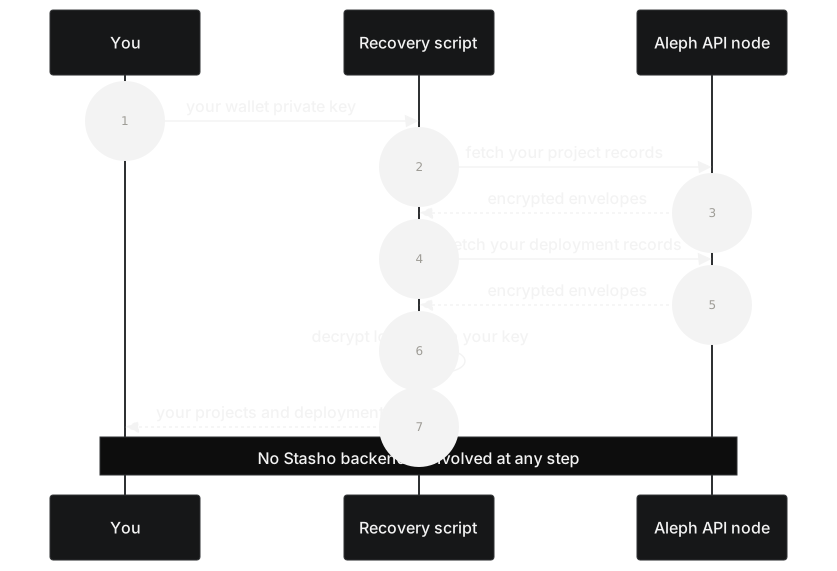
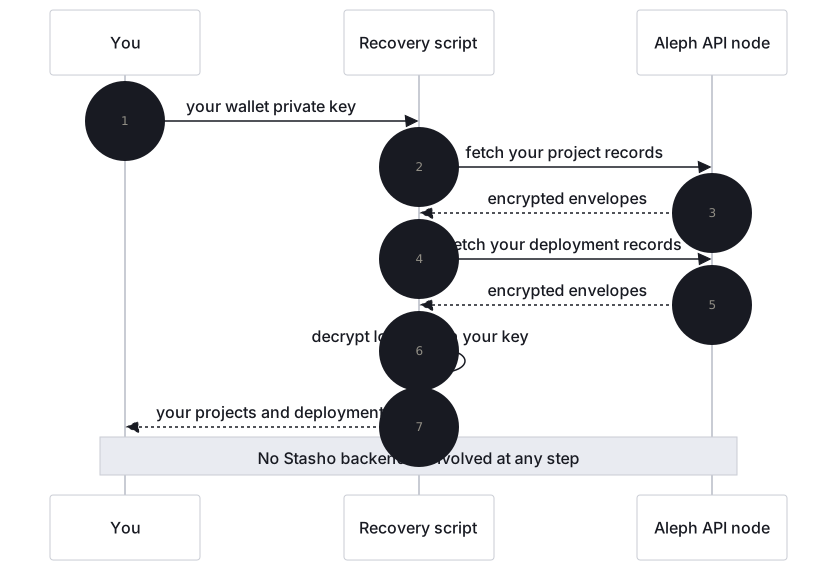
This guide walks you through reconstructing your full Stasho project and deployment history using only your wallet's private key. The recovery script does not depend on our backend — it talks directly to the public network your records are stored on.
Network: records are Aleph messages on mainnet; API: https://api.aleph.im (the script's default; any public API node works, e.g. https://api2.aleph.im).
The standalone recovery script lives at scripts/recovery/ in the project repository. If you'd rather write your own tool in a different language, the storage schema is a complete, language-agnostic spec.
Alpha note
The project repository is private during the alpha, so the link and git clone below won't work for you yet. Email hello@stasho.xyz and we'll send you the script. The repository goes public no later than the beta — independence is the point of this guide, and we know a script you have to ask us for isn't fully independent yet. The storage schema is published in full today, so you can already build your own recovery tool without us.
When to use this
- You no longer trust the platform and want to verify your data is portable
- The platform has gone away (bankrupt, compromised, taken down)
- You want to migrate your project history to a new tool
- You want to audit what data exists about your projects on the public network
What you need
- Your wallet's private key. Export it from MetaMask (Settings → Security → Show Private Key) or whatever wallet you use to sign in. The script never transmits this key anywhere; it only uses it locally to decrypt your data.
- Node.js 22 or later. Verify with
node --version. - The recovery script source. Clone the project repository and run it from
scripts/recovery/. - Your wallet address. The 0x-prefixed Ethereum address you used to sign in.
Steps
1. Install the script
git clone https://github.com/stasho-xyz/stasho-app.git
cd stasho-app/scripts/recovery
npm install
2. Run it
The script reads your private key from the USER_PRIVATE_KEY environment variable. Never pass it as a CLI flag — it would leak into your shell history.
export USER_PRIVATE_KEY=0xYOUR_PRIVATE_KEY_HERE
npm run recover -- --address 0xYOUR_WALLET_ADDRESS --output ./my-recovery.json
You should see output like:
[recover] Wrote 3 projects, 21 deployments, 0 warnings to ./my-recovery.json3. Inspect the output
Open my-recovery.json. You'll see a JSON document with:
wallet— the address you recoveredrecoveredAt— timestamp of the recoverystats— counts of messages read, projects + deployments recoveredprojects— your full list of projects, each containing its own list of deploymentswarnings— any non-fatal issues encountered during recovery
Each project includes its name, source repo, branch, build configuration, and the full deployment history (with status, CID, URL, commit, error, etc.).
Schema v4 (May 2026 onwards): Each deployment POST references its artifact by storeRef (the STORE message's item_hash). The recovery script fetches each STORE to resolve storeRef → cid, and records the outcome per deployment as storeStatus.
If a project was deleted, its STORE has been FORGOTten: the script reports cid: null, storeStatus: "forgotten" and a STORE_FORGOTTEN warning — the deployment metadata survives but the artifact CID is no longer recoverable.
If the network's own garbage collection reclaimed the STORE because the account paying for it ran out of balance or credits, the script reports storeStatus: "removed" with a STORE_REMOVED warning. The artifact is equally unrecoverable, but nobody deleted it — so the remedy is different: fund the account before re-uploading.
A STORE that simply isn't on the node you queried is reported differently, as storeStatus: "absent" with a STORE_ABSENT warning. This is not the same as "forgotten" or "removed" — it means that node had no such message, which can also happen if the node is behind or you queried the wrong one. Try re-running against a different API node before concluding the artifact is gone.
4. Verify against the audit endpoint (optional)
If our backend is still running, you can compare your recovery output to what the backend claims:
curl https://api.stasho.xyz/api/audit/0xYOUR_WALLET_ADDRESS | jqThe backendView.cachedProjects and backendView.cachedDeployments should match your recovery output's stats.projectsRecovered and stats.deploymentsRecovered. Any discrepancy means either a bug or, in the worst case, backend dishonesty. The recovery script is the ground truth.
Recover an app bundle
If you deployed a project to an App VM rather than IPFS static hosting, your deployment history includes an extra artifact: the encrypted application bundle itself (the built server code your App VM runs). Recovering it uses the exact same cryptographic building blocks as the rest of this page, with one difference: the recovered bundle is a tar archive, not a JSON document, so the final step is not the same.
This path isn't wired into npm run recover as a flag yet. Everything below is a straight walk through building blocks the recovery script already implements in scripts/recovery/src/decrypt.ts, you're assembling the same pieces yourself, in the same order.
Start from your wallet's raw private key. The same key the rest of this page uses.
Derive your encryption key, exactly as described in the storage schema. Fully offline, no network call needed.
Fetch the bundle's envelope. Resolve the deployment record's
storeRefto a STORE message, then fetch its bytes the same way the rest of recovery resolves artifacts. Optionally checksha256(bundle) === bundleHashfrom the deployment's public block before trusting the bytes.Unwrap
deks.encryptionwith your derived key (ECIES, same mechanism as every other envelope in this app).AES-256-GCM decrypt
ctwith the unwrapped key,iv, andtag.Write the result to disk as-is, without parsing it. This is the one place bundle recovery diverges from every other decryption in this app: don't
JSON.parsethe plaintext. A bundle's decrypted contents arebundle.tar.gz's raw bytes, not JSON, and parsing it will throw. Write the buffer directly:tswriteFileSync("bundle.tar.gz", plaintext); // raw bytes, no JSON.parseUntar and verify.
tar -xzf bundle.tar.gzgives youmanifest.jsonandapp.tar.gz. Confirmsha256(app.tar.gz) === manifest.artifactHashto make sure nothing was corrupted in transit or storage.
Don't JSON.parse the plaintext
Every other decryption in this app (projects, deployments) ends with JSON.parse(plaintext). An app bundle's plaintext is a tar archive. Parsing it as JSON will throw immediately, write the raw bytes to a file instead.
Verify your implementation
Before trusting a hand-rolled version of this against real data, check it against the project's own round-trip test. It encrypts random bytes with freshly generated VM and user keypairs, decrypts through both recipients using the exact same calls above, and asserts the result matches the original byte-for-byte:
cd apps/backend && npx vitest run tests/bundle-encrypt-script.test.ts(This requires the project repository, which is private during the alpha; see the note at the top of this page.)
Troubleshooting
"private key derives to X, not Y" — Your private key doesn't match the address you supplied. Double-check both.
"network API unreachable" — Try a different API node with --aleph-api <url>.
Warnings about decryption failures — Some messages couldn't be decrypted. This usually means the encryption envelope is malformed or tampered with. The script skips these and continues, but the warnings tell you which messages had issues.
Empty output — Your wallet has no Stasho data on the current channel. Either you've never used the platform with this wallet, or you're looking at the wrong channel. The channel was renamed twice: ALEPH-CLOUDAPP → STASHO_CHANNEL_V0 on 2026-05-07 (Decision #98), then STASHO_CHANNEL_V0 → STASHO_CHANNEL_V1 on 2026-05-20 (Decision #117); alpha data on each prior channel was retired at the rename. The recovery script's default targets STASHO_CHANNEL_V1. To inspect an older channel, override with --channel STASHO_CHANNEL_V0 or --channel ALEPH-CLOUDAPP.
Warning codes
The recovery output includes a warnings array. The codes you might see:
| Code | What it means |
|---|---|
STORE_FORGOTTEN | A deployment's STORE was definitively FORGOTten (project was deleted). Metadata is in the output but cid is null. Together with STORE_REMOVED, one of the two codes that mean the artifact is genuinely gone. |
STORE_REMOVED | The network's own garbage collection reclaimed the STORE because the account paying for it ran out of balance or credits. Nobody issued a delete. cid is null and the artifact is gone from the network's index; fund the account before re-uploading. |
STORE_ABSENT | The node had no such STORE, or it wasn't usable (not a STORE message, carrying no CID, or rejected / still pending). Not the same as forgotten or removed — the node may be behind, or another node may still have it. Try re-running against a different node with --aleph-api <url>. |
STORE_FETCH_FAILED | The API node didn't respond when the script tried to resolve a storeRef. Try re-running. |
LEGACY_SCHEMA | A deployment uses the pre-May-2026 schema (inline cid, no storeRef). The script handles it gracefully by reading cid directly. |
ALEPH_MESSAGES_TRUNCATED | The API node capped the response. Re-run with a date filter or paginate. |
Independence
The script depends only on:
- The network's public HTTP API (any node)
- Standard cryptographic primitives (AES-256-GCM, ECIES-secp256k1)
- Node.js stdlib + two npm packages (
eciesjs,ethers)
No part of this recovery flow depends on our infrastructure remaining online. If you have your private key and access to any API node, you can recover your data forever.