Your first deployment
This page covers what happens after you pick a repo: framework detection, the build, the deploy phases, and what "live" means.
Prerequisite: imported a repo.
What works on Stasho
The app deploys static sites — HTML, CSS, JavaScript, and assets that a CDN can serve directly without a server runtime.
Supported frameworks (auto-detected):
| Framework | Build command | Output directory |
|---|---|---|
| Next.js (static export) | next build (with output: "export" in next.config.ts) | out/ |
| React (Vite) | vite build | dist/ |
| Vue (Vite-based) | vite build | dist/ |
| Astro | astro build | dist/ |
| Nuxt (static) | nuxt generate | .output/public/ or dist/ |
| Static HTML | none | repo root or whatever directory you pick |
Auto-detection inspects your package.json and root files. You can override the build command and output directory in the wizard, and change everything later in Build settings.
Not supported (anything that needs a server at request time):
- Next.js with API routes, middleware, or RSC streaming (full SSR)
- Nuxt without
nuxt generate(full SSR) - Astro with
output: "server"or"hybrid"(SSR) - Remix without a static adapter
- Express, Fastify, Hono, anything with a runtime API
If your project needs server-side rendering, the sovereign tier (planned, not yet shipped) will host long-running runtimes per user. Until then, build a static export or pick a different framework.
The deploy phases
After you confirm the build config and click Deploy, the deployment row goes through these statuses. You see them in real time in the dashboard.


live; an App VM deploy finishes at pinned.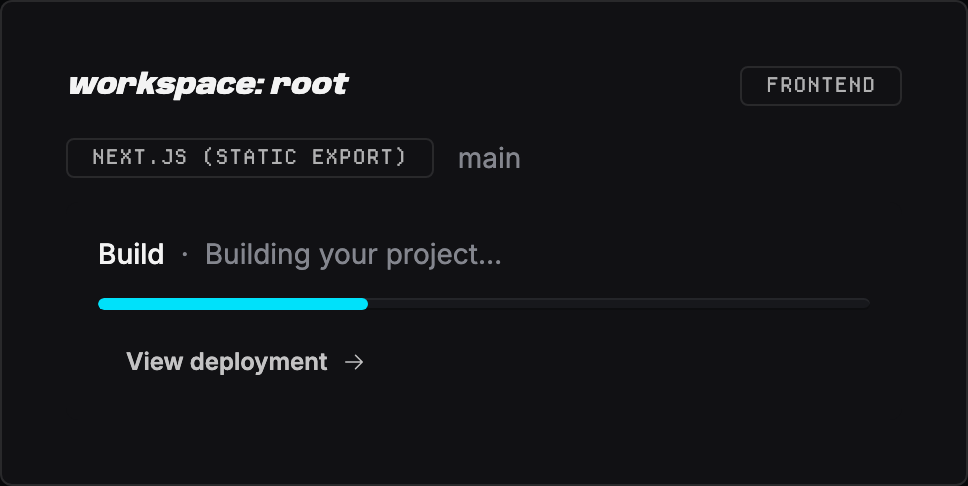
building shows here as the Build stage.| Status | Shown as | What's happening |
|---|---|---|
pending_workflow | Setup pending | First deploy only: the app opened a PR in your repo that adds the deploy workflow, and it's waiting for you to merge it. Use the Merge & deploy button in the app, or merge the PR on GitHub. |
queued | Queued | The workflow is dispatched; GitHub Actions hasn't picked it up yet |
installing | Installing | The Actions runner is installing dependencies |
building | Building | The build command is running |
uploading | Uploading | The build artifact is being uploaded to the app's backend |
pinning | Publishing | The backend is pinning the artifact to IPFS |
pinned | Pinned | App VM deploys only: the build is pinned and the VM's supervisor is picking it up. The app's health checks decide what happens next — live when it answers, failed when it never comes up. |
live | Live | The deployment is reachable at its gateway URL |
failed | Failed | A step above broke; see the error in the deployment row |
awaiting_resign | Re-authorization required | A deploy write was blocked because the app's delegate key is missing a grant from your wallet. The Redeploy button becomes Re-authorize — one signature in Settings → Authorizations fixes it. See Keys & authorizations. |


pinned to live or failed.If a step fails, the row turns red and shows the last 50 lines of build output. Open the GitHub Actions run (link in the deployment row) for the full log.
A deployment that sits in-flight for more than 30 minutes without progress is automatically marked failed — you don't have to wait it out. You can also end one yourself with Abandon (see Manage deployments).
What "live" means
When a deployment reaches live, three things become true:
- The artifact is pinned on IPFS — the build output has a CID (content identifier) and is reachable through any IPFS gateway
- The CID is recorded on-chain — a STORE message references the CID, signed by our backend's delegate key authorized by your wallet
- A gateway URL points at the CID — the deployment row shows a URL like
https://<cid>.ipfs.aleph.sh/
You can also attach a custom domain so each deploy serves at your own host. Until you do, the gateway URL is the canonical address.
IPFS hosting quirks
IPFS gateways serve your build output as literal files. Two things that work on most traditional hosts don't work here:
Extension-less ("clean") URLs. A link to /about will 404 even if about.html exists — the gateway doesn't rewrite URLs. Configure your generator to emit links with the .html suffix (for VitePress: cleanUrls: false; for Next.js static export this is the default behavior). Directory links like /blog/ work when the directory contains an index.html.
Client-side routed deep links. A single-page app that handles /dashboard/settings in JavaScript will 404 when that URL is loaded directly, because there's no file at that path and no server to fall back to index.html. Use hash-based routing, pre-render every route to a real file, or accept that deep links only work via in-app navigation.
If your site renders at the gateway URL but internal navigation 404s, this is almost always why — not a broken deploy.
When something breaks
Common failures and where to look:
| Symptom | Cause | Fix |
|---|---|---|
Stuck at pending_workflow | The workflow PR hasn't been merged | Merge it — Merge & deploy in the app, or on GitHub |
Stuck at queued for >5 min | GitHub Actions runner queue is busy | Check the Actions tab of your repo on GitHub; if nothing moves, Abandon and redeploy |
Fails at installing | npm ci failed — usually a package-lock.json mismatch | The workflow uses npm install rather than npm ci to tolerate this; if you still hit it, ensure package.json and package-lock.json match locally and push |
Fails at building | Build command errored | Click into the deployment row to see the captured stderr; open the linked Actions run for the full log |
Fails at uploading | Backend rate limit (50 MB per upload, 1 GB per day per wallet) | Reduce artifact size or wait until the daily quota resets at UTC midnight |
Fails at pinning | Storage network issue | Retry the deploy; transient |
Verification
You should now see:
- A deployment row in the live state on your project's detail page
- A gateway URL (
https://<cid>.ipfs.aleph.sh/) that, when clicked, renders your site - The Verify on-chain disclosure (closed by default in the deployment row) shows the chain of on-chain messages that produced the live state
Subsequent pushes to your repo's production branch redeploy automatically. No further configuration needed.
From here you can manage deployments (redeploy, roll back, abandon), set environment variables, or adjust build settings.
See it in the demo
The demo frontend project shows a completed IPFS deployment end to end, including the gateway URL and the Verify on-chain disclosure.