Custom domains
This page covers attaching your own domain to a project, the DNS records you need, the statuses you'll see, and how long each one takes.
Prerequisite: your first deployment is live.
How it works
Your domain points at the IPFS gateway, and a record in the on-chain domains aggregate tells the gateway which deployment (CID) to serve for your host. Every successful deploy re-points that record at the new build automatically — you set the DNS once and never touch it again.
This means a custom domain involves two independent systems:
- Your DNS provider — where you create the records below. You control this.
- The IPFS gateway — which reads the on-chain record and publishes your site. The app drives this for you.
Most of the waiting you'll see is one of these two propagating. Neither is instant, and they move on their own schedules.
DNS records to create
At your DNS provider, for the host you want (e.g. app.example.com), create three records:
| Type | Name | Value |
|---|---|---|
| CNAME | app.example.com | ipfs.public.aleph.sh. |
| CNAME | _dnslink.app.example.com | _dnslink.app.example.com.static.public.aleph.sh. |
| TXT | _control.app.example.com | your wallet address (shown in the attach dialog) |
The _control TXT proves you own the domain — the gateway only serves a host whose _control record matches the wallet that wrote the on-chain record.
Then attach the domain in the project's Domains panel. The app does the on-chain write; you do the DNS.
Bare (apex) domains
A bare domain (example.com, no subdomain) can't carry a CNAME — DNS forbids one at the zone apex. Two ways around it:
- ALIAS / ANAME record at the apex pointing to
ipfs.public.aleph.sh., if your provider offers one. - A record at the apex pointing to the gateway's current IP —
dig +short ipfs.public.aleph.shtells you what it is right now.
If you use a CDN's CNAME-flattening (Cloudflare and the like), the record must be DNS-only / unproxied. A proxied record answers with the CDN's IPs instead of the gateway's, the Domains check never sees a match, and the domain stays PENDING DNS.
The Domains panel still labels the first row CNAME; it marks it resolving as soon as the apex's A record matches the gateway's. The _dnslink and _control records are subdomains of your host and stay as shown in the table.
The statuses you'll see
The Domains panel shows one status per host. Here's what each means and how long it lasts.


LIVE, and the states it can fall into along the way. Both return to LIVE once the cause is fixed — see the table below.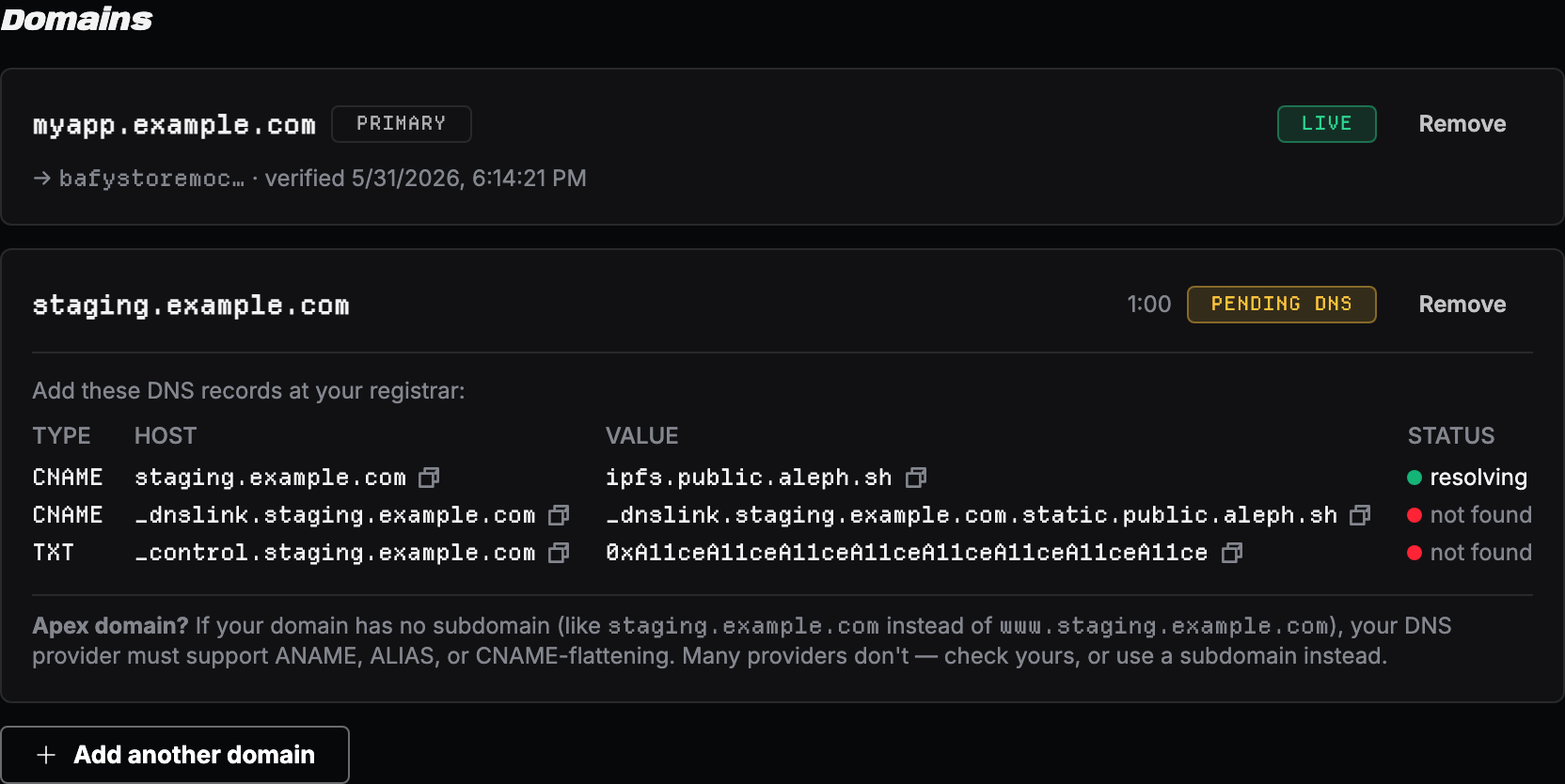
_control value is your own wallet address, not the example one shown here — and shows which of them have been found so far. It rechecks on the countdown next to the status.| Status | Meaning | Typical duration |
|---|---|---|
| PENDING FIRST DEPLOY | You've attached the domain, but no deployment has reached live yet. The domain has nothing to serve until then — DNS isn't checked at this stage. | Until your first deployment goes live |
| PENDING DNS | The app is waiting for your three DNS records to resolve. The panel shows a ✓/✗ per record and rechecks every 60s. | Until your DNS provider propagates — minutes to a few hours, your provider's call |
| FINALIZING | Records resolve; the on-chain record is written in seconds. Now waiting for the IPFS gateway to pick up the new CID and start serving it. | Variable and gateway-side — anywhere from a few minutes to 40+ minutes (see the note below) |
| LIVE | The gateway is serving your current deployment at your domain, and your DNS records are intact. The host becomes a clickable link. | — |
| UNREACHABLE | The gateway still has your site, but one of your DNS records was removed, so visitors can't resolve it. | Until you restore the missing record |
| GATEWAY ERROR | The gateway accepted the record but is failing to serve the CID. This is usually a gateway-side issue and often clears on its own. | Retryable; if it persists, redeploy |
Why FINALIZING can take a while after a redeploy
This is the most common point of confusion, so it's worth stating plainly:
After a redeploy, your domain keeps serving the previous build until the IPFS gateway picks up the new one — and the dashboard's FINALIZING reflects that accurately.
The on-chain pointer to your new build is written within seconds. But the shared IPFS gateway re-checks and republishes each domain on its own schedule, and that step is variable — we've measured the same redeploy take 7 minutes one time and 40 minutes the next. Until the gateway picks it up, visiting your domain still shows the old build. FINALIZING means exactly that: the new version isn't being served at your domain yet.
There's nothing you can do to speed this up, and redeploying again won't help — it's a gateway-side step, not something the app or your DNS controls. Your new build is always reachable immediately at its raw gateway URL (https://<cid>.ipfs.aleph.sh/, shown in the deployment row) if you need to verify or share it before the domain catches up.
A first-time attach has the same gateway wait, plus your DNS provider has to propagate the new records and the gateway has to issue a TLS certificate for a host it's never seen.
When to worry
| Symptom | Likely cause | What to do |
|---|---|---|
| PENDING DNS with a ✗ that never turns ✓ | A record is wrong (typo, missing trailing dot, wrong host) | Re-check the record against the table above at your DNS provider |
| FINALIZING for a long time (even 30–40+ min) after a redeploy | Normal — the gateway re-publish step is variable and gateway-side | Confirm the deployment itself reached live; if so, just wait. Redeploying again does not help. Use the raw https://<cid>.ipfs.aleph.sh/ URL meanwhile |
| FINALIZING for hours after a first attach | DNS still not propagating, or _control doesn't match your wallet | Verify all three records resolve from a public resolver; confirm _control is your exact wallet address |
| UNREACHABLE | A DNS record was deleted | Restore the missing CNAME/TXT |
| GATEWAY ERROR that won't clear | Gateway-side serving failure | Redeploy; it's retryable |
Verification
A domain is fully working when:
- The Domains panel shows LIVE and the host is a clickable link
- Visiting
https://<your-host>/renders your current deployment - Each new push to your main branch re-points the domain automatically — you'll see it pass through FINALIZING (for a variable, sometimes long, gateway-side wait) and back to LIVE